

Visitor counter with Automatic gate
OBJECTIVE
To develop an automatic visitor counting system using Arduino that tracks people entering and exiting through IR sensors. The system controls a gate using a servo motor and displays the current count on an LCD.
MODULES REQUIRED
- Arduino nano
- 2 x IR sensors
- LCD Display 16 x 2 i2c
- Servo (gate )
SCHEMATIC DIAGRAM
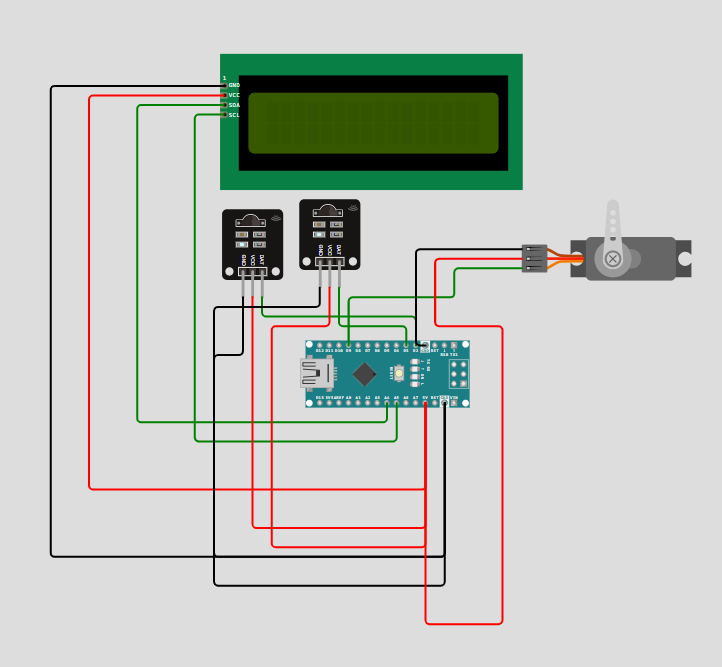
SCHEMATIC CONNECTION
Connect Lcd :
Connect IR1 and IR2 :
Connect Servo:
To begin your project, click this template link:
ARDUINO CODE
#include (Wire.h)
#include (LiquidCrystal_I2C.h)
#include (Servo.h)

LiquidCrystal_I2C lcd(0x27, 16, 2);  // LCD address may vary
Servo gateServo;

const int entryIR = 2;   // IR sensor at entry
const int exitIR = 3;    // IR sensor at exit
int peopleCount = 0;
bool entryState = false;
bool exitState = false;

void setup() {
  pinMode(entryIR, INPUT);
  pinMode(exitIR, INPUT);
  gateServo.attach(9);
  lcd.begin(16, 2);
  lcd.backlight();
  lcd.setCursor(0, 0);
  lcd.print("Visitor Counter");
  delay(2000);
  lcd.clear();
  updateDisplay();
}

void loop() {
  // Detect Entry
  if (digitalRead(entryIR) == LOW && !entryState) {
    entryState = true;
    peopleCount++;
    openGate();
    updateDisplay();
  }
  if (digitalRead(entryIR) == HIGH) {
    entryState = false;
  }

  // Detect Exit
  if (digitalRead(exitIR) == LOW && !exitState) {
    exitState = true;
    if (peopleCount > 0) peopleCount--;
    openGate();
    updateDisplay();
  }
  if (digitalRead(exitIR) == HIGH) {
    exitState = false;
  }
}

void updateDisplay() {
  lcd.clear();
  lcd.setCursor(0, 0);
  lcd.print("People Inside:");
  lcd.setCursor(0, 1);
  lcd.print(peopleCount);
}

void openGate() {
  gateServo.write(90);  // Open gate
  delay(1000);
  gateServo.write(0);   // Close gate
  delay(1000);
}