
A modern technology banner image

Distance-Based Traffic Control Using Arduino and Ultrasonic Sensors

OBJECTIVE

This project aims to control traffic flow using Arduino by detecting vehicle distances with ultrasonic sensors. Based on proximity, LEDs and an I2C LCD display provide real-time alerts to enhance road safety.

MODULES REQUIRED

  • Arduino uno
  • Led (Red & Green)
  • 2 x ultrasonic sensors
  • Lcd 16 x2 I2C
  • Resistor 220 Ω

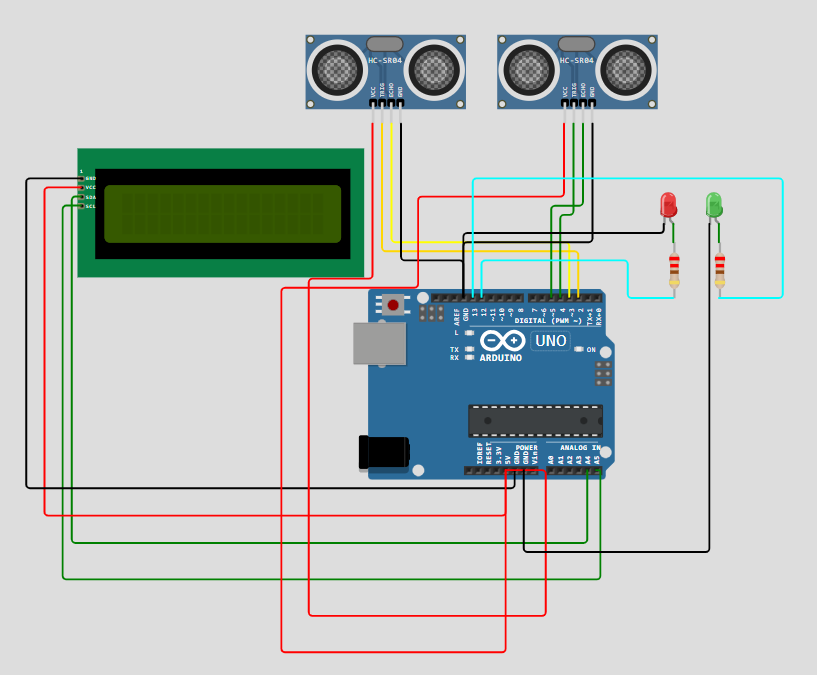
SCHEMATIC DIAGRAM

Schematic diagram showing an Arduino connected to an LED and a push button.

SCHEMATIC CONNECTION

Connection LCD :

  • Connect the VCC pin of the LCD to the 5V pin on the Arduino .
  • Connect the GND pin of the LCD to the GND pin on the Arduino.
  • Connect the SDA pin of the LCD to pin A4 on the Arduino.
  • Connect the SCL pin of the LCD to pin A5 on the Arduino
  • Connect ultrasonic sensor :

  • Connect the vcc pin of the ultrasonic sensor to the 5v on the Arduino .
  • Connect the Trig pin of the ultrasonic sensor to D2 on the Arduino .
  • Connect the echo pin of the ultrasonic sensor to D3 on the Arduino.
  • Connect the GND pin of the ultrasonic sensor to GND on the Arduino .
  • Connect ultrasonic sensor2:

  • Connect the vcc pin of the ultrasonic sensor to the 5v on the Arduino .
  • Connect the Trig pin of the ultrasonic sensor to D4 on the Arduino .
  • Connect the echo pin of the ultrasonic sensor to D5 on the Arduino.
  • Connect the GND pin of the ultrasonic sensor to GND on the Arduino .
  • Connect leds :

  • Connect digital pin D12 of the Arduino Uno to the anode of LED1 via a resistor.
  • Connect the GND pin of the Arduino uno to the Cathode of LED1
  • Connect digital pin D13 of the Arduino Uno to the anode of LED2 via a resistor.
  • Connect the GND pin of the Arduino uno to the Cathode of LED2
  • To begin your project, click this template link:

    Simulate on Wokwi

    ARDUINO CODE

    
    #include (Wire.h)
    #include (LiquidCrystal_I2C.h)
    
    // Set the LCD address to 0x27 for a 16 chars and 2 line display
    LiquidCrystal_I2C lcd(0x27, 16, 2);
    
    // Ultrasonic sensor pins
    const int trigPin1 = 2;
    const int echoPin1 = 3;
    const int trigPin2 = 4;
    const int echoPin2 = 5;
    
    // LED pins
    const int redLED = 12;
    const int greenLED = 13;
    
    long duration1, distance1;
    long duration2, distance2;
    
    void setup() {
      lcd.init();               // Initialize the LCD
      lcd.backlight();          // Turn on the backlight
      pinMode(trigPin1, OUTPUT);
      pinMode(echoPin1, INPUT);
      pinMode(trigPin2, OUTPUT);
      pinMode(echoPin2, INPUT);
      pinMode(redLED, OUTPUT);
      pinMode(greenLED, OUTPUT);
      lcd.print("Distance Sensor");
      delay(2000);
      lcd.clear();
    }
    
    void loop() {
      distance1 = getDistance(trigPin1, echoPin1);
      distance2 = getDistance(trigPin2, echoPin2);
    
      lcd.setCursor(0, 0);
      lcd.print("L:");
      lcd.print(distance1);
      lcd.print("cm ");
    
      lcd.setCursor(8, 0);
      lcd.print("R:");
      lcd.print(distance2);
      lcd.print("cm ");
    
      if (distance1 < 10 || distance2 < 10) {
        digitalWrite(redLED, HIGH);
        digitalWrite(greenLED, LOW);
        lcd.setCursor(0, 1);
        lcd.print("Stop Vehicle     ");
      } else {
        digitalWrite(redLED, LOW);
        digitalWrite(greenLED, HIGH);
        lcd.setCursor(0, 1);
        lcd.print("Clear to Go      ");
      }
    
      delay(500);
    }
    
    long getDistance(int trigPin, int echoPin) {
      digitalWrite(trigPin, LOW);
      delayMicroseconds(2);
      digitalWrite(trigPin, HIGH);
      delayMicroseconds(10);
      digitalWrite(trigPin, LOW);
      long duration = pulseIn(echoPin, HIGH);
      long distance = duration * 0.034 / 2;
      return distance;
    }


    INSTRUCTIONS

  • Assemble the circuit by connecting all components as shown in the schematic diagram.
  • On the left side of the screen, open sketch.ino and write your Arduino code.
  • After completing the circuit and writing the code, click the green Play button to start the simulation.
  • To display distances and control LED signals based on vehicle proximity,
  • WORKING PRINCIPLE

  • The project uses two ultrasonic sensors to measure vehicle distance, with readings processed by Arduino and shown on a 16×2 I2C LCD. Based on proximity, a red LED signals "Stop" if a vehicle is too close, while a green LED signals "Go" if the path is clear.

  • Project Link

    for your reference.

    `