

Sugarcane Vending machine
OBJECTIVE
To design a sugarcane juice vending machine that operates by inserting coins and pressing a button to automatically extract and dispense fresh juice.
MODULES REQUIRED
- Arduino uno
- Push button
- Relay
- Buzzer
- Lcd 16 x 2 i2c
- Servo
SCHEMATIC DIAGRAM
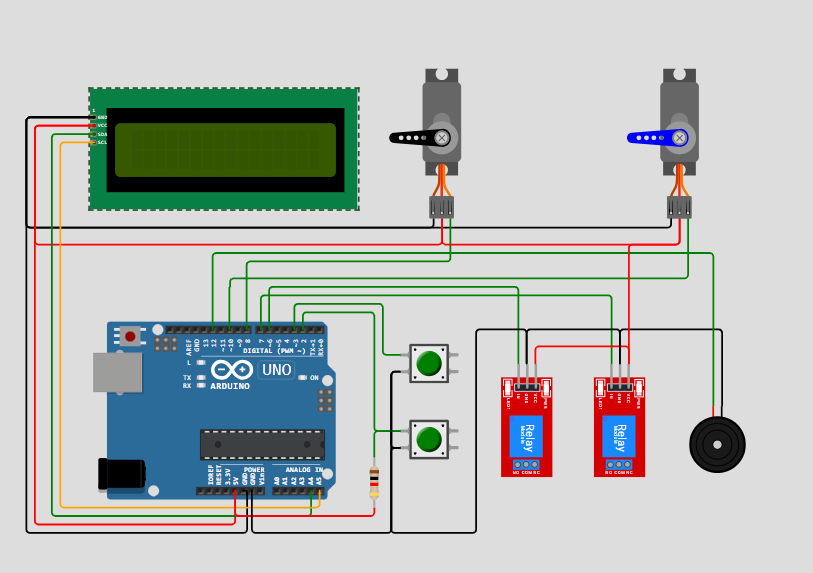
SCHEMATIC CONNECTION
Connect lcd :
Connect servo 1 and servo 2 :
Connect Relay1 & Relay 2 :
Connect push button:
To begin your project, click this template link:
ARDUINO CODE
#include (LiquidCrystal_I2C.h)
#include (Servo.h)

LiquidCrystal_I2C lcd(0x27, 16, 2);
Servo servo_A, servo_B, servo_C;

#define coinSlot 2
#define button 3
#define buzzer 12
#define motorA 6
#define motorB 7

unsigned long motorA_on = 60000, delay_motorB = 2000, motorB_on = 5000;
unsigned long servo_A_on = 500, servo_C_on = 10000;
unsigned long timeA_on, timeB_on, countdown_timer, servo_timer, display_blink;
int init_pos = 0, final_pos = 90;
int required_amount = 30, inserted_amount = 0, count_num = 5;
byte state = 0;
bool t = true, countdown = false, move_servo = false, run_motor = false;

void setup() {
  lcd.init(); lcd.backlight(); lcd.clear();
  servo_A.attach(8); servo_B.attach(9); servo_C.attach(10);
  servo_A.write(init_pos); servo_B.write(init_pos); servo_C.write(init_pos);
  lcd.setCursor(0, 0); lcd.print("   SUGARCANE");
  lcd.setCursor(0, 1); lcd.print("VENDING MACHINE");
  delay(2000); lcd.clear();

  pinMode(motorA, OUTPUT); pinMode(motorB, OUTPUT);
  digitalWrite(motorA, LOW); digitalWrite(motorB, LOW);
  pinMode(button, INPUT_PULLUP); pinMode(coinSlot, INPUT);
}

void loop() {
  switch (state) {
    case 0:
      lcd.setCursor(0, 0); lcd.print("    PLEASE    ");
      lcd.setCursor(0, 1); lcd.print("INSERT COINS!!!");

      if (!digitalRead(coinSlot)) {
        inserted_amount += 5;
        tone(buzzer, 1000, 50);
        lcd.setCursor(0, 0);
        lcd.print(" Bal. Php: " + String(inserted_amount) + ".00");
        delay(50);
      }

      if (inserted_amount >= required_amount) {
        lcd.setCursor(0, 0); lcd.print(" Bal. Php: " + String(inserted_amount) + ".00");
        lcd.setCursor(0, 1); lcd.print("PRESS BUTTON!!!");
        count_num = 5;
        state = 1;
      }
      break;

    case 1:
      if (digitalRead(button) == LOW && !countdown && !run_motor) {
        lcd.setCursor(0, 0); lcd.print(" - GO JUICEEE! -");
        lcd.setCursor(0, 1); lcd.print("Dispensing in: ");
        countdown = true; move_servo = true;
        countdown_timer = servo_timer = millis();
      }

      if (move_servo) {
        unsigned long elapsed = millis() - servo_timer;
        if (elapsed < 50) { servo_A.write(final_pos); servo_C.write(final_pos); }
        if (elapsed > servo_A_on) servo_A.write(init_pos);
        if (elapsed > servo_C_on) servo_C.write(init_pos);
      }

      if (countdown && (millis() - countdown_timer > 1000 || count_num == 5)) {
        count_num--; countdown_timer = millis();
        tone(buzzer, 500, 500);
        lcd.setCursor(15, 1); lcd.print(count_num + 1);
        if (count_num < 0) {
          delay(1000);
          countdown = false; run_motor = true;
        }
      }

      if (run_motor) {
        unsigned long now = millis();
        if (!digitalRead(motorA)) { digitalWrite(motorA, HIGH); timeA_on = now; }

        if (now - timeA_on >= delay_motorB && now - timeA_on < delay_motorB + 20) {
          digitalWrite(motorB, HIGH); timeB_on = now;
        }
        if (now - timeB_on >= motorB_on) digitalWrite(motorB, LOW);
        if (now - timeA_on >= motorA_on) { digitalWrite(motorA, LOW); state = 2; }

        if (now - display_blink >= 500) {
          lcd.setCursor(0, 0); lcd.print("-- Dispensing --");
          lcd.setCursor(0, 1); lcd.print(t ? ". . . . . . . . " : " . . . . . . . .");
          display_blink = now; t = !t;
        }
      }
      break;

    case 2:
      lcd.clear(); lcd.setCursor(0, 0); lcd.print("  THANK YOU!!!");
      tone(buzzer, 2000); delay(200); noTone(buzzer);
      delay(150); tone(buzzer, 1800, 250); delay(1500);
      inserted_amount = 0; move_servo = false; run_motor = false;
      state = 0;
      break;
  }
}