

Automatic School Bell system
OBJECTIVE
The project aims to build an Automatic School Bell System using Arduino Uno, I2C LCD, and a buzzer to ring bells automatically as per a set timetable, ensuring timely periods and breaks without manual effort.
MODULES REQUIRED
- Arduino uno
- RTC DS1307
- Buzzer
- LCD 16 X 2 I2C
SCHEMATIC DIAGRAM
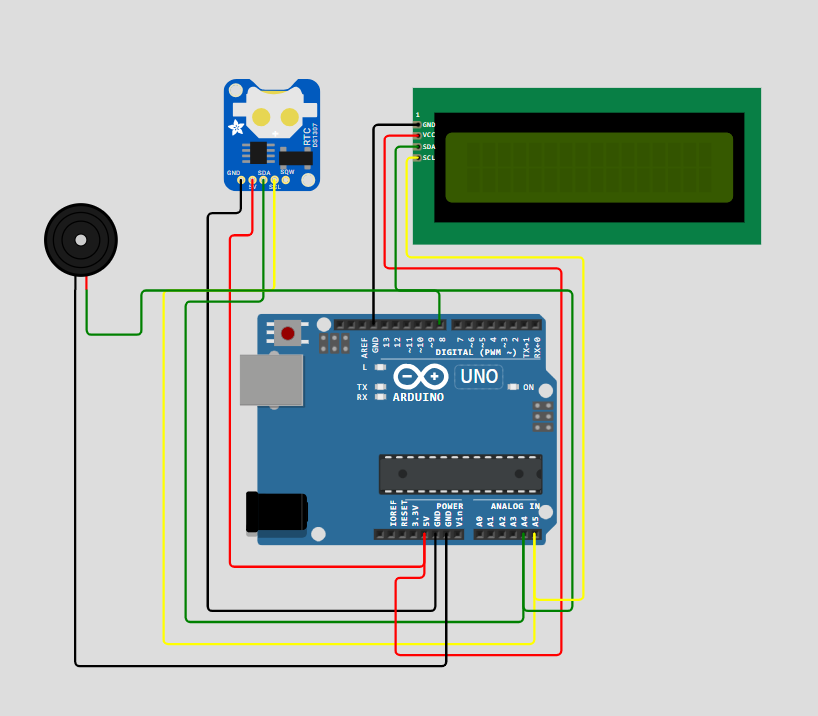
SCHEMATIC CONNECTION
Connect LCD :
Connect RTC :
Connect buzzer :
To begin your project, click this template link:
ARDUINO CODE
#include (Wire.h)
#include (LiquidCrystal_I2C.h)

LiquidCrystal_I2C lcd(0x27, 16, 2);
const int buzzerPin = 8;

int hour = 8;
int minute = 29;
int second = 50;

void setup() {
  Wire.begin();
  lcd.begin(16, 2);
  lcd.backlight();
  pinMode(buzzerPin, OUTPUT);

  lcd.setCursor(0, 0);
  lcd.print("School Bell Sys");
  delay(2000);
  lcd.clear();
}

void loop() {
  delay(1000);
  second++;
  if (second >= 60) {
    second = 0;
    minute++;
  }
  if (minute >= 60) {
    minute = 0;
    hour++;
  }
  if (hour >= 24) {
    hour = 0;
  }

  displayTime();

  if (second == 0 && (
    (hour == 8 && minute == 30) || // Start
    (hour == 9 && minute == 10) || // Period 1 Ends
    (hour == 9 && minute == 50) || // Period 2 Ends
    (hour == 10 && minute == 30) || // Period 3 Ends
    (hour == 10 && minute == 50) || // Break Start
    (hour == 11 && minute == 0) ||  // Break Over
    (hour == 11 && minute == 40) || // Period 4 Ends
    (hour == 12 && minute == 20) || // Period 5 Ends
    (hour == 13 && minute == 0)  || // Lunch Start
    (hour == 13 && minute == 40) || // Lunch Over
    (hour == 14 && minute == 20) || // Period 6 Ends
    (hour == 15 && minute == 0)  || // Period 7 Ends
    (hour == 15 && minute == 40) || // Period 8 Ends
    (hour == 16 && minute == 0)     // School Ends
  )) {
    Ring Bell();
  }
}

void displayTime() {
  lcd.setCursor(0, 0);
  lcd.print("Time: ");
  if (hour < 10) lcd.print('0');
  lcd.print(hour);
  lcd.print(':');
  if (minute < 10) lcd.print('0');
  lcd.print(minute);
  lcd.print(':');
  if (second < 10) lcd.print('0');
  lcd.print(second);
  lcd.print("  ");
}

void ringBell() {
  lcd.setCursor(0, 1);
  lcd.print("Bell Ringing...  ");
  for (int i = 0; i < 3; i++) {
    tone(buzzerPin, 1000);
    delay(500);
    noTone(buzzerPin);
    delay(500);
  }
  lcd.setCursor(0, 1);
  lcd.print("                "); // Clear
}