
A modern technology banner image

Movement Detection Using PIR Sensor and Arduino

OBJECTIVE

The objective of this project is to detect human movement using a PIR sensor and Arduino to trigger a response such as lighting an LED .

MODULES REQUIRED

  • Arduino uno
  • Pir motion sensor
  • LED

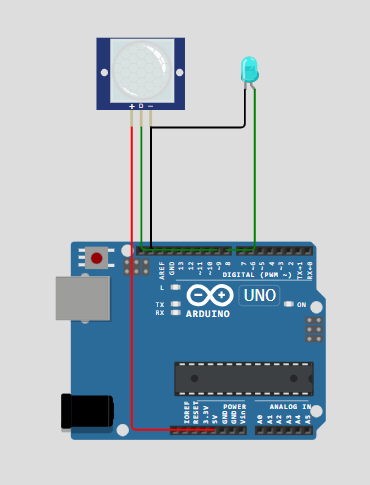
SCHEMATIC DIAGRAM

Schematic diagram showing an Arduino connected to an LED and a push button.

SCHEMATIC CONNECTION

Connect pir :

  • Connect the +ve (vcc) of the pir sensor to the 5V pin on the Arduino .
  • Connect the D(signal)pin of the pir sensor to the D9 pin on the Arduino.
  • Connect the -ve (GND )pin of the pir sensor to the Gnd pin on the Arduino .
  • Connect led:

  • Connect the +ve pin of the led to the D8 pin on the Arduino.
  • Connect the -ve pin of the led to the GND pin on the Arduino
  • To begin your project, click this template link:

    Simulate on Wokwi

    ARDUINO CODE

    
    int led = 8;
    int pir = 9;
    int state = LOW;
    int val = 0;
    void setup() {
    pinMode(led, OUTPUT);
    pinMode(pir, INPUT);
    Serial.begin(9600);
    }
    void loop(){
    val = digitalRead(pir);
    if (val == HIGH) {
    digitalWrite(led, HIGH);
    delay(100);
    if (state == LOW) {
    Serial.println("Movement detected!");
    state = HIGH;
    }
    }
    else {
    digitalWrite(led, LOW);
    delay(200);
    
    if (state == HIGH){
    Serial.println("No movement!");
    state = LOW;
        }
      }
    }


    INSTRUCTIONS

  • Assemble the circuit by connecting all components as shown in the schematic diagram.
  • On the left side of the screen, open sketch.ino and write your Arduino code.
  • After completing the circuit and writing the code, click the green Play button to start the simulation.
  • When the motion is detected, the LED will turn ON. The serial monitor shows movement activated. There is no motion detected; the LED turns OFF, the serial monitor shows no movement
  • WORKING PRINCIPLE

  • The PIR sensor detects motion and sends a signal to the Arduino, which turns ON the LED and displays "Movement Activated"; if no motion is detected, the LED turns OFF and "No Movement" is shown.

  • Project Link

    for your reference.

    `