

Smart Garage Door ESP-32
OBJECTIVE
This project builds a Smart Garage Door using ESP32 for wireless control, demonstrating IoT-based motor control and sensor integration for secure remote access.
MODULES REQUIRED
- Esp-32
- Pir motion
- Servo
- Led
SCHEMATIC DIAGRAM
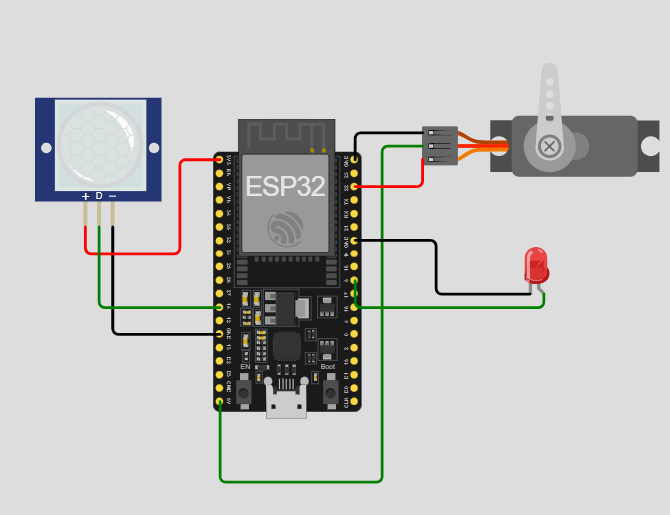
SCHEMATIC CONNECTION
Connect pir :
Connect servo:
Connect LED:
To begin your project, click this template link:
ARDUINO CODE
#include (ESP32Servo.h) // Servo library for ESP32

// Pin definitions
#define PIR_PIN 14       // PIR sensor pin
#define SERVO_PIN 22     // Servo motor pin
#define LED_PIN 5        // LED indicator pin

Servo doorServo;         // Servo object for the door

void setup() {
  Serial.begin(115200);            // Initialize Serial Monitor
  doorServo.attach(SERVO_PIN);     // Attach servo to pin
  pinMode(PIR_PIN, INPUT);         // Set PIR as input
  pinMode(LED_PIN, OUTPUT);        // Set LED as output
  doorServo.write(0);              // Initial servo position (closed)
  digitalWrite(LED_PIN, LOW);      // LED off at start
  Serial.println("System Ready");
}

void loop() {
  int motionDetected = digitalRead(PIR_PIN); // Read PIR sensor

  if (motionDetected == HIGH) {      // If motion is detected
    Serial.println("Opening door...");

    doorServo.write(180);            // Open door
    digitalWrite(LED_PIN, HIGH);     // LED on
    delay(1000);                     // Keep open for 1 second

    Serial.println("Closing door...");
    doorServo.write(0);              // Close door
    delay(1000);                     // Wait for door to close
    digitalWrite(LED_PIN, LOW);      // LED off

    delay(2000);                     // Avoid immediate retriggering
    Serial.println("System Reset");
  }
  delay(500);                        // Check sensor periodically
}